HOME | News | OVERVIEW | DOCUMENTATION | COMMERCIAL SUPPORT | ABOUT | FAQ | Weblog

-
Keep updated with the lazarussupport twitter account
August 20, 2011
Some people mailed me that they like this side, but would like to be informed when a new blog or news-item is posted. Intentionally I had the idea to add a rss-feed, but that takes some time which I still haven't found. So I decided to create a Twitter-account. I will use it primarily to send tweets about updates on this site.
For now I will only tweet when there is something new on this site. I'm hesitating a bit if I should post all news on this site, or only send a tweet about it. But first I'm curious what response the twitter-account will get.
-
Delphi uses Free Pascal for their iPad support
August 6, 2011
Finally there's some more news about the new Delphi version, which will be called Delphi XE2. As expected, there is no VCL support for OS/X. All existing applications have to be re-written using the new Firemonkey library. So Lazarus will remain the only VCL-compatible option to develop for OS/X.
But what really was a surprise, is to see that Embarcadero also supports Firemonkey on the iPad. But that means they need to have an ARM-compiler. This mystery was solved by a comment from Michael Swindel. Embarcadero will uses the Free Pascal compiler for it's iPad support.
Patches are welcome
This is very good news. It does show that even Embarcadero consider Free Pascal to be a mature, stable compiler. Above that due to Free Pascal's gpl-license they are not allowed to alter the compiler without publishing the source-code. So maybe we will see some Free Pascal patches send in by Embarcadero employees. They are really welcome!
-
Can't find the units lresources or interfaces
April 18, 2011

While analyzing the traffic to this site I was surprised to see that still so many Lazarus users are asking Google for a solution for their problems with the lresources and interfaces units. Reason enough to spend an article on the issue.
The Lazarus Component Library (LCL) and widgetsets
Both units are part of the Lazarus Component Library (LCL). This is a Lazarus-package which contains the units with all the classes to create GUI applications.
The problem with this package is that it has something special that no other package has: it has been split up for different widgetsets. As soon as the 'interfaces' unit is included into your project, it is linked to such a widgetset.
By widgetset the Lazarus developers mean a collection of graphical controls which you can use to build applications. You can select which set of controls you want to use. On Windows almost ever
 one uses the controls which are part of the Windows API. But you could also use the controls from QT, GTK or Carbon/cocoa on OS/X.
Before you can use these controls, the LCL has to be compiled for the widgetset you have chosen. And, but this holds for all units, the unit has to be compiled by the same Free Pascal compiler version and for the same combination of CPU and OS (target) as your application.
So when you encounter the error message 'Can't find unit interfaces used by ...', you have to make sure that the LCL is compiled for the same compiler version (and thus also the versions of the RTL and FCL), CPU, OS and widgetset. Besides that the compiler has to be able to find the compiled units from the LCL.Check your settings and installation
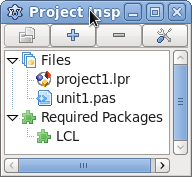
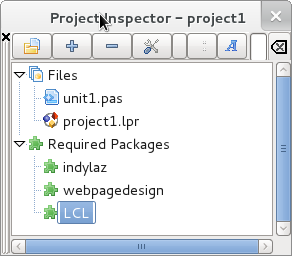
First thing to check are the project-settings. Make sure that your project has the 'LCL' as a required package, or else it will be unable to find the units. You can check this in the Project Inspector. Second step is to find out for which widgetset you are compiling. This can be found in the Project Options, on the 'Compiler options' section. The widgetset is set there as the 'LCL Widget Type'. Note that the widget type is something different then the operating system you are compiling for. This can be confusing on Windows, because the default widgetset there is 'win32/win64' while the operating system (in the 'code generation' section of the project options) is 'Win32' or 'Win64'.
As an extra safety check also check whether the right compiler-executable and Lazarus-directory are used. These two settings can be found in the 'Environment' section of the 'Environment/IDE options'.
(Re)compile the LCL
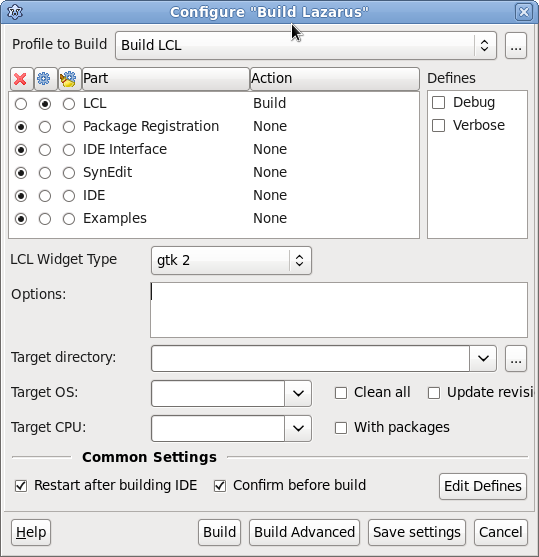
If there are no problem with the above settings and the problem does still persist, it could be that the LCL is simply never compiled for the current combination of widgetset,OS and CPU. It could also be that the compiled units are out-of-date because another version of the Free Pascal compiler is used. Or there have been some changes in some Free Pascal units in the LCL or RTL. In all these cases the solution is to recompile the LCL.
Recompiling the LCL sounds difficult, but it isn't. Just go to 'Tools'/'Configure build Lazarus'. Select the 'Build LCL' profile to only build the LCL. If you want to, you can also choose to recompile the complete IDE, but to solve the 'can't find unit interfaces' problem recompilation of the LCL is enough. Make sure the correct widget type, OS and CPU are selected and choose 'build'.
In some cases you do not have the right to write to the location where the compiled LCL units are stored. In that case you won't be able to compile the LCL. Log in as an user who has these rights and try again.
Why is all this so difficult?
For new users this might seem a lot of work, and one may wonder if it really has to be that difficult. But do not forget that other development environments like Delphi only support one type of widgets while Lazarus supports several. This is a nice feature but it comes at a cost. On the other hand you can see that Lazarus evolves and that the developers try to minimize problems like these. In the current development version 0.9.31 the LCL is no longer a special package, but a normal package. You can select the widgetset you want to use with a simple define or macro. The big advantage of this approach is that when you compile your application, the IDE tries to detect if the LCL is compiled for the used target and/or widgetset. If this is not the case the LCL will be re-compiled automatically, just like it is done for other packages. Hopefully this will solve this problem once and for all.
-
Projects (settings) in Delphi and Lazarus
September 9, 2011
Earlier I wrote that there are a lot of things which are, compared to Delphi, better implemented in Lazarus. One of those things are projects and packages.
Project settings part of the code?
It always puzzled me why Delphi stores part of the project information not in the project-file (.dproj) but in the source-file (.dpr.) The information of which units are part of the project, and their location is not stored inside the project, but within the source. So every unit you add to the project will be added to the main project source, even if there is no need to. Vice versa only units in the main project source are available in the project manager.
Lazarus, on the other hand, stores this information in the project settings file, as it should. So you do not need to adapt the source code to add a unit to the project. In this settings file (.lpi) all project-settings are stored. But if you want you can specify to store session-specific information into a separate .lps file. This is useful when you are using a revision control system like subversion or git.
 Projects and dependencies
Lazarus and Delphi both support build-modes, to switch easily between different project and/or compiler settings. But what I really miss in Delphi is to add dependencies on packages. In Lazarus you can use the Project Inspector to see which packages the application needs. On opening the project the IDE will check if those dependencies are available and warn if they are not. Additionally it will add the unit-output location of the dependencies to the search-path of the project. This way you don't have to alter the search-path manually for every package that you use. It also makes it easier to switch to another working-environment, since it doesn't matter at which location the compiled-unit files of those packages are stored. As long as the package is installed, the right path will be added. And when one of the source-files from a packages is updated, the package will be re-compiled automatically when the project is compiled. Also if the package is not yet compiled for the specific target you are compiling for, the package will be compiled for that target automatically. If you want to do something similar in Delphi, you'll have to add the package-sources to the search path of your project, which results in compiled version of the units in those packages all over the place...
Packages can also push other settings to projects that depends on them. This can be used for example to add some compiler defines when a package is being used in a project. In short: working with projects and packages dependencies in Lazarus makes project-maintenance a lot easier.Project groups
But, to be fair, there is also something that Delphi has that Lazarus hasn't: project groups. With these groups you can handle a group of packages easily within the Project Manager. Now you could argue that these groups aren't really needed when you can add dependencies on packages in projects. But it could be very useful if you are building a server/client application and want to switch between the client and server project very easily. So we'll have to wait for someone who is so annoyed by the lack of this in Lazarus, that he or she implements it...
Settings macro's
Both Delphi and Lazarus have some sort of macro's which can be use in the project settings. In Delphi there are the 'system variables' like '$(BDSCOMMONDIR)' which can be used in the search paths. You can change and add these system variables. This can help in those situations that you do not know what the location of some files is on the current system. Although Lazarus has a better solution to to add the location of compiled units to the search path, as shown above. It also has so-called 'IDE Macros'. They are somewhat similar to Delphi's system variables, but the result of these macro's can depend on some other settings and they support parameters, like '$Ext(unit1.pas)' to get the extension from the file unit1.pas.
The most used IDE Macro's are indefinitely $(TargetCPU) and $(TargetOS), to set the unit-output directory to 'lib/$(TargetCPU)-$(TargetOS)', so that the unit files for each different target are placed in another directory. But there are a lot more of such macros.
Conclusion
There are more differences in project settings between Delphi and Lazarus, but I think I handled the most important ones, especially those who you will encounter when switching from Delphi to Lazarus. And they show some of the nice features that Lazarus has to offer, above the rich feature-set of Delphi.
-
Delphi vs Lazarus, an introduction
April 26, 2011
You can find a lot of comparisons between Delphi and Lazarus on the net, but it strikes me that those comparisons are almost always focused on the compiler. In fact they are more comparisons between Delphi and Free Pascal. The biggest difference - Free Pascal is cross platform and supports 64 bit while Delphi doesn't yet(?) - is always mentioned. But a comparison of IDE features is practically always missing. When you're lucky there's a sentence like 'the Delphi IDE has more advanced features'.
Which is strange, because I like the Lazarus IDE more then the Delphi IDE. On the Lazarus demonstrations I give I always show a few useful features of Lazarus that Delphi does not have or which are implemented badly on Delphi. They never fail to impress the audience.
Speed
At first there is the difference in speed. Delphi startup times are really bad while Lazarus starts almost instantly. At my Lazarus presentations I always start Delphi before I begin. When I've finished the introduction I take a look at the screen to see if Delphi is already started. It never is. When it's finally there I start Lazarus which I can use immediately to start the demonstration. The startup-time impresses people without me having to say a word...
And it's not the startup-time alone. The Lazarus IDE outperforms Delphi on all tasks.
Simple features which gives the productivity a boost
In the first paragraph I stated that Delphi has some features that are just not implemented right. Let me explain that with an example. When you use 'Find declaration' in the Delphi IDE, you can always jump back using the 'alt-left' key combination. This could be a commonly used feature, if it was working consistently. But when you use 'alt-up' or 'alt-down' to switch between the implementation- and definition-section from a class, you can't jump back anymore! It's even worse, the cursor will jump to a prior location, which is maybe long forgotten. The same holds when you switch between tabs: 'alt-left' won't help you to switch back. In Lazarus on the other hand, you can use ctrl-(shift)-h to jump back and forth, following all your actions.
Simple things like this jumping back-and-forth functionality make Lazarus a better IDE to work with. You can spend less time on actually typing and investigating code, so there is more time to do the actual development.
The advantage of Open Source
It's not that strange that Lazarus is better in small things like this. When a Lazarus developer is annoyed because jumping back and forth doesn't work, he is free to fix the problem immediately. When he misses a tiny feature which can improve his production a lot, he or she is able to add that functionality. And all other users can take advantage of their work. If you encounter something annoying on Delphi though, all you can do is report it on Code Central, and hope it will be implemented in a newer version. But when the new Delphi release is there, will you buy it only because you can jump back and forth between different tabs using the 'alt-arrow' keys? I guess you won't, and that's why it is less interesting for Embarcadero to implement such features. If a developer working at Embarcadero finds it annoying that 'alt-arrow' doesn't work, he just has to continue his work on some shiny-new-feature he was assigned to. A feature that Embarcadero can put on the advertisements for the new release...
So are there things at which the Delphi IDE is better then Lazarus? Of course, among others Delphi XE comes with a profiler, a subversion client and multi threading debugging out-of-the-box. With Lazarus this is all more difficult. Lazarus also lacks something like Modelbuilder. But serious, when do you use that?
Tips and tricks for Lazarus users
I will write more articles about features of the Lazarus IDE that Delphi lacks. You can see them as a 'tips and tricks' section for users who switched from Delphi to Lazarus and want to get more out of it. You can also regard it as a list of reasons why you should switch from Delphi to Lazarus. And maybe.. maybe someone at Embarcadero will read these posts and decide to implement all these Lazarus features into the next Delphi release. So that in those cases I have to use Delphi, I won't be annoyed anymore about the rudimentary Delphi IDE.
-
Visit to the Delphi Developer Days
May 16, 2011
Today I visited the first of the two Delphi Developer Days in Amsterdam. Cary Jensen and Marco Cantu were giving lectures about several aspects of Delphi. Bob Swart was there as a guest speaker and Pawel Glowacki from Embarcadero was there for a keynote.
Delphi cross-platform support is years behind Lazarus.
Pawel told more about the Delphi Roadmap. This year's new Delphi version will finally support 64 bit on Windows, like Free Pascal does since September 2007. And there will be the possibility to cross-compile to Mac OS/X. Delphi itself will not run on OS/X though. A year later it might be possible to build 32 bit Linux server applications. And in the far future full 32 and 64 bit support for Mac OS/X and Linux is planned. And maybe even ARM. In short: within three years Delphi may have the cross-platform functionality Lazarus has today.
Existing VCL Delphi applications will not run on OS/X with Delphi.
Even when Delphi supports OS/X you won't be able to compile your existing applications on Mac OS/X. Maybe you remember how Embarcadero is always emphasizing that, unlike Microsoft, their products have always been backwards compatible. Your Delphi 1 application from 1993 may still work Delphi XE. But if you want to deploy on OS/X, this is no longer the case. You will have to rebuild your application using the new 'VCL Plus' which isn't backwards compatible, despite it's name. So probably it will be easier to run your VCL applications on OS/X by switching to Lazarus, then waiting for the new Delphi release.
3D components?
Pawel also shortly mentioned that the technology bought from KSDev will be used in VCL Plus. Last winter I demonstrated the KSDev components on OS/X and Lazarus. Those were based on openGL and they look impressive. Probably that is what the new VCL Plus will bring us. But it will throw away backwards compatibility.
But was there any good news?
Well, despite my criticism, it is good to see that Embarcadero is putting this much effort in Delphi. That they present a clear roadmap with no false promises, but with a steady upgoing line. And I learned why Delphi has the 'run without debugging' feature so prominently in the main menu. Cary Jensen said he had to run without debugging, or else he couldn't show us the code. And it is commonly know that the Delphi debugger changes from a full-featured IDE in some sort of Notepad as soon you start the debugger. I never realized that to overcome this problem, the 'run without debugging' can be used...
-
Lazarus usage statistics
May 2, 2011
Sometimes it's frustrating to work on a project as a volunteer, while you can not know how many people use it. For the software that I develop at work I know quite accurate how many people are using it. For Lazarus it's just guessing.
Now the latest Lazarus release is a month old there's a new opportunity for an educated guess. In the table below I've gathered the Sourceforge download amounts of version 0.9.30 in April. I think that users who download the new release within a month are really interested in the product.
OS Downloads Estimated users 32 bit Windows 23002 17251 64 bit Windows 4583 3437 OS/X powerpc 121 108 OS/X intel 1831 1647 Linux i386 rpm 1219 1097 Linux x86_64 rpm 1029 926 Linux i386 deb 2579 2321 Linux x86_64 deb 685 616 Total 35049 24045 I was quite surprised that Lazarus was downloaded over 35000 times within a month after the release! And this is not even a complete overview because there are also other download locations. A lot of users on Linux and maybe OS/X for example will download their applications from a central repository. Most Linux distributions for example have their own central repository from which you can download and install applications.
Lazarus more popular on Windows then Linux and OS/X?
Maybe that the central repositories on Linux can explain why there are so much more downloads for Windows then Linux and OS/X. But it's very common that those repositories offer older versions, so the Lazarus users what want to use the latest version are still dependent on Sourceforge. I guess that even taking the central repositories into account, you can say that about 4 of the 5 Lazarus users are using Windows as main development platform. I think that will amaze a lot of people who do think that Lazarus is mainly used by Linux/Apple users who can not use Delphi. These numbers prove otherwise.
So how many Lazarus users are there?
But these are downloads, can we estimate the real amount of users? That's difficult off course, but let's make a guess. Taking into account that there are other ways to get Lazarus then a Sourceforge download, and that not anyone who downloads Lazarus also really uses it let's say that 75% of people who downloaded Lazarus are really using it. For Linux and OS/X I think the percentage is somewhat higher because of the central repositories, say 90%. I've put these calculated estimates in the table.
Adding those numbers to get an idea for the total amount of Lazarus users isn't fair, though. Because some users will work on Linux, OS/X and Windows. So I divided the amount of OS/X and Linux users by half and then added them to the amount of Windows Lazarus users.
That leads to an amount of 24000 Lazarus users. It's a rough estimate. And if this amount of users is high or low I leave to everyone to decide on his own. But I'm really content with it.
Java-bytecode target added to the Free Pascal compiler.
August 20, 2011
A new target has been added to Free Pascal compiler. It is now possible to compile applications to Java bytecode. This means that these Free Pascal applications can run in a Java Virtual Machine (JVM), so that it can run on any platform that has Java support.
Dutch Pascal conference 2011.
June 12, 2011
After the success from last year, the Dutch Pascal Users Group organizes the second Dutch Pascal Conference on June 18th. Last year it was mainly focused on Lazarus, this year there will also be some topics about Delphi.

-- Alexander Grau, Germany